

Visionati for Figma
Your designs have dozens of images with no alt text. Developers ship what they get. Select your images, pick an AI model, and describe them before handoff.
Install from Figma Community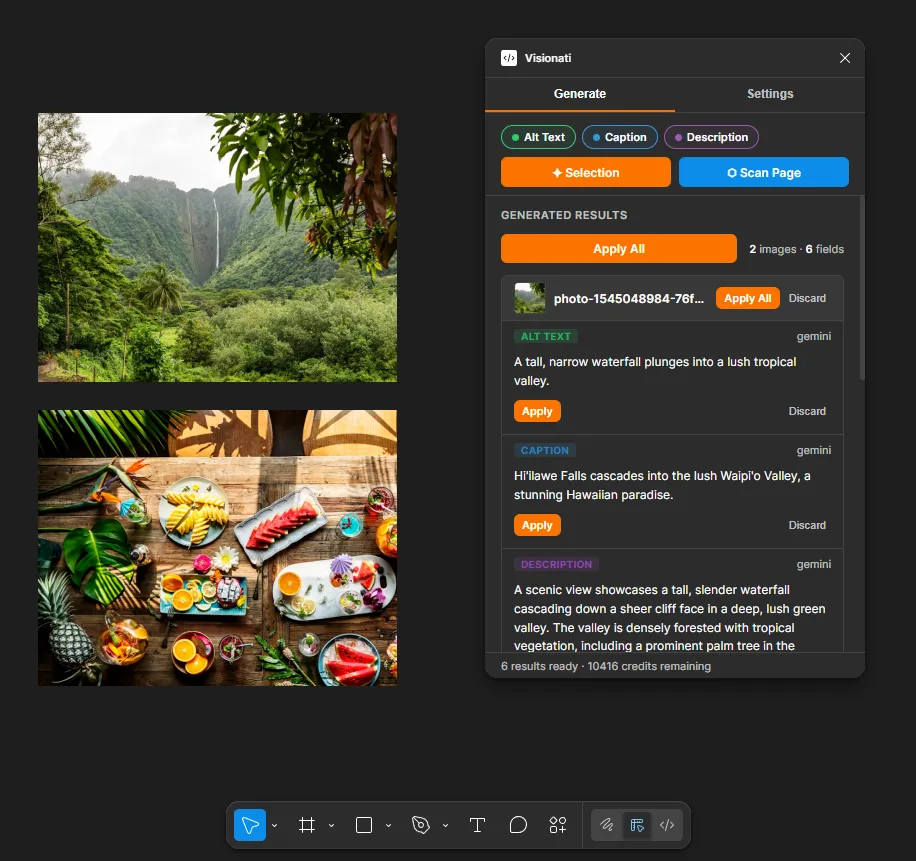

Three Fields, Color-Coded
Alt Text (green), Caption (blue), Description (violet). Each field is written as its own annotation category on the image node. Generate one, two, or all three at once.

Preview Before Apply
Results appear grouped by image with thumbnails and field badges. Edit any text inline. Apply per field, per image, or everything at once. Nothing is written until you say so.

Scan the Entire Page
Select specific layers or click Scan Page to find every image on the current page. Images are processed in parallel with real-time progress.

Dev Mode Ready
Annotations flow straight into Dev Mode during handoff. Each field carries its own color and category, so developers can tell them apart at a glance. No extra steps.
Built for Designers
Accessible copy belongs at the design phase, not as an afterthought in code review. Write it where you design it.
7 AI Models
Claude, Gemini, OpenAI, Grok, Jina AI, LLaVA, and BakLLaVA. Different models notice different details. Pick the one that fits your project and budget.

Custom Prompts
Every field type has a purpose-built default: concise for alt text, brief for captions, detailed for descriptions. Or write your own prompt to override everything.

160+ Languages
Set a language once in settings and every generation uses it. Ship accessible designs for any market without switching tools.

Your Images Stay Private
Images are sent to the Visionati API for analysis and never stored. Nothing leaves Figma until you configure an API key and click Generate.